 9 min read

Robyn Meadows
Your Experts Need Your Deepest Documentation
Novice users need short, structured content they can act on immediately. Expert users need depth, reference detail, and edge cases. Here’s the five-level pattern behind that split and how to design for it.
Key Takeaways
- Experience level determines documentation needs, not just length. Novices need short, structured, step-by-step content; experts need deep reference material, edge cases, and exceptions, in opposite proportions.
- Topic-based authoring, whether DITA’s three topic types or the Diataxis framework’s four, solves this by splitting content by what the reader needs to do with it, not by how much they already know going in.
- A power user of your product isn’t automatically an expert in a new feature. Product-wide fluency doesn’t transfer to something they’ve never used, so documentation for new features should assume novice status regardless of a user’s overall tenure.
I recently started a new hobby: disc golf. On its face it seems fairly simple. Throw a frisbee (disc) into a basket. At first I had typical beginner problems. As a right-hand player who throws backhand, my frisbees would fly up and crash out to the left. To fix this I had to correct a number of issues, introducing me to an overwhelming amount of new vocabulary: hyzer, anhyzer, stable, overstable, understable, forehand, sidearm, launch angle, nose angle, x-step, power pocket, turn, fade, overpowered, hit point, arming the disc, and more.
As a beginner, it was too much and confusing. I just want to throw straight, ideally as far as possible. I don’t really want to understand the physics of how a wing (the disc) creates lift as it moves through air. I didn’t really need to know that a tailwind will push a disc to the ground faster.
And yet, so many explanations of how to throw far go into the minutiae of your footwork, coil, wrist position, or, yes, wind direction. There is a 90-minute video on YouTube explaining the aerodynamics of disc flight. But it’s not what a beginner needs. (It’s excellent, by the way.)
Documentation teams naturally want to cover everything: anticipate every question, explain every term, walk through every step. The impulse is common. It’s also, quite often, wrong. Novice users need structure, not volume. They need short, self-contained bites they can act on right now, not detailed guides they’re not yet equipped to use. Meanwhile, your power users are the ones who actually benefit from depth or the minutiae.
Documentation needs by experience level
User experience runs along a continuum: novice, intermediate, advanced, practitioner, and expert. Each level brings distinct cognitive characteristics and, as a result, distinct documentation needs. (Skill-acquisition researchers Hubert and Stuart Dreyfus mapped something functionally identical in their five-stage model of adult skill acquisition. The same pattern shows up wherever people move from following rules to working on instinct or from muscle memory.)
When I started disc golf, the rule that mattered wasn’t about lift or spin rate. It was “keep the disc flat on release.” That’s all I needed: one clear instruction. An expert — a power user — operates intuitively. They’ve internalized so many patterns that what to do next is obvious. Power users even have different approaches to achieve the same result.
These groups need fundamentally different documentation:
| Level | Content that serves them |
|---|---|
| Novice | Step-by-step procedures, no assumed context, explicit rules |
| Intermediate | Rules plus situational examples, recognizable patterns |
| Advanced | Goals, decision tables, conceptual overviews |
| Practitioner | Pattern-level guidance, cases and anti-patterns |
| Expert | Quick-reference lookups, edge cases, exceptions; full context assumed |
Completeness means different things at each level. For a novice, it means “don’t make me think, tell me what to do.” For an expert, it’s the nuances or in-the-weeds details that provide even greater context. The same document cannot serve both well. Of course, in practice, you’re often designing for a population that spans multiple levels, which is where the architecture decisions become consequential.
So what does this mean for how you structure a documentation set? It means you can’t optimize for one level without creating problems for another.
Macro content vs. micro content by experience level
Content volume runs in opposite directions depending on which type you’re writing.
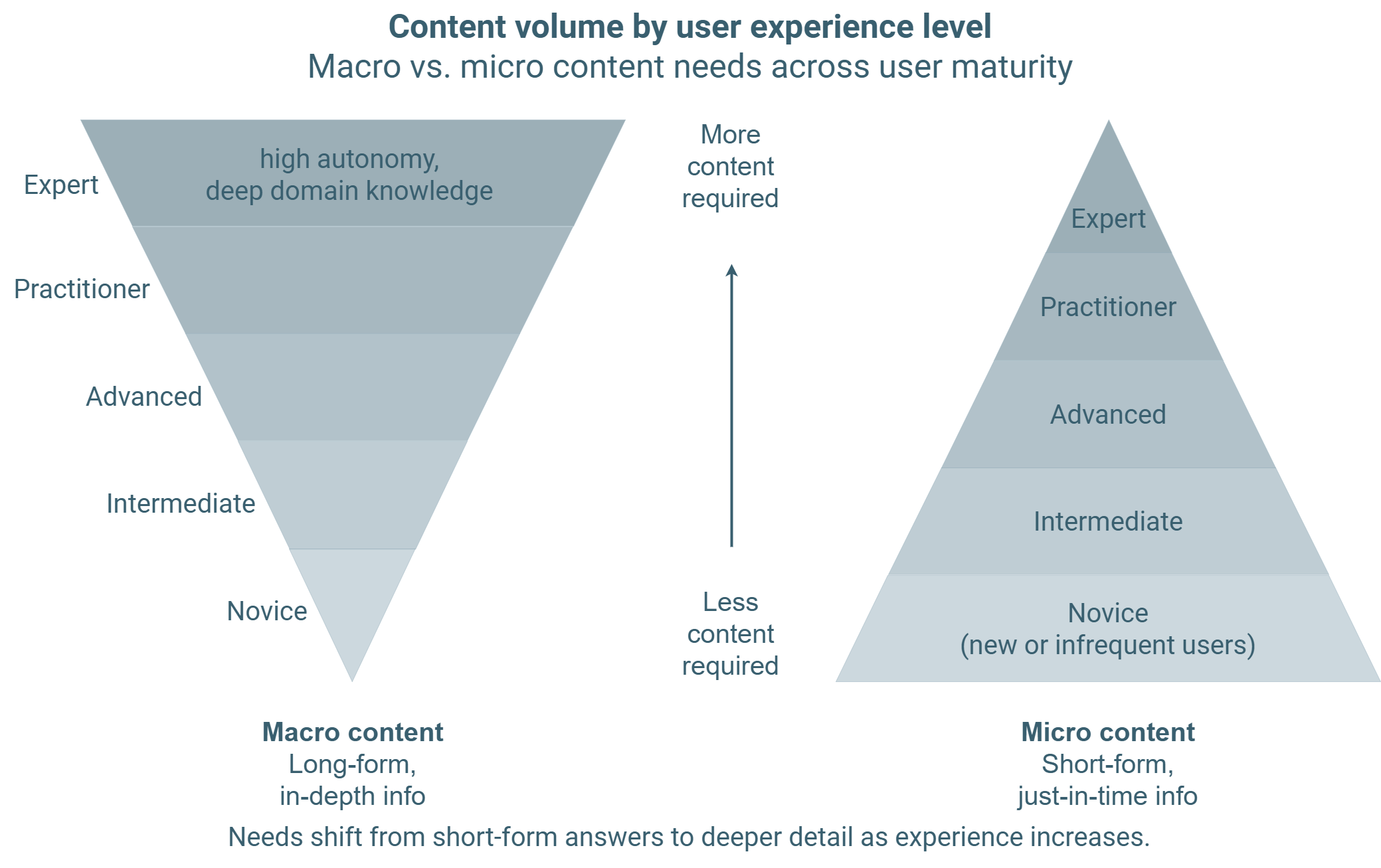
Macro content grows with expertise. Micro content shrinks with it — the same five levels this piece uses throughout.
The documentation minimalism debate
As documentarians, we have wrestled with this question for decades. John M. Carroll published The Nurnberg Funnel in 1990, showing short, task-focused documentation outperformed the detailed manuals of the era. Users with ‘just enough’ documentation completed tasks faster and made fewer mistakes.
Experts need detailed reference material, conceptual explanations, or to look up edge cases. Optimizing for novices doesn’t serve them. In fact, it actively frustrates them: step-by-step instructions of things they already know gets in the way of the information they actually came for.
This brings us to topic-based authoring: Concept topics for the advanced-to-expert user who needs to understand why, task topics for the novice-to-intermediate user who needs to know how, and reference topics for the expert who needs the quick lookup. (DITA formalized this as its three core topic types, and the logic holds regardless of whether you’re working in DITA or not.) Or perhaps you subscribe to the Diataxis framework that uses a different but similar approach with tutorials, how-to guides, explanation, and reference. Both approaches provide an architecture for combining content types.
Like disc golf professionals discussing where they put thumb pressure on the disc, there are multiple approaches to reaching the same outcome. DITA and Diataxis are the equivalent of different grips on the same throw: split content by what the reader needs to do with it, not by how much they already know going in.
Vocabulary by experience level
Novice users also have a different vocabulary from experts, and this affects more than writing level. UX practitioner Harry Court, writing about a redesign for a local government website, observed that experts shift to more specific, domain-level terms when naming things. A building professional calls it a “DA” rather than “permission to build.” Naturally, both groups are searching for the same information using different words. This difference is more pronounced with medical and health writing, where the vocabulary is drastically different between the trained and the layperson.
The solution from Mr. Court’s project: reserve titles for novice vocabulary and descriptions for expert vocabulary. Page titles used accessible, everyday language. Descriptions surfaced the technical terms practitioners rely on. Both audiences could find what they needed without either group having to translate across the other’s language first. (Hint: search logs supported this — expert-specific terms like “DA” and “CDC” appeared consistently in query data, which was what led the team to put them in descriptions rather than ignoring them altogether.)
This kind of design requires knowing how your novices actually talk about their tasks. That knowledge comes from user research.
Macro content for expert users
At the expert end of the spectrum, brevity starts working against you. A power user has spent years accumulating domain knowledge. They can absorb information quickly. What they’re looking for is the specific fact they don’t yet have: a parameter range, a behavior exception, an example of the anti-pattern they’ve been warned about.
The implication for information architecture is that deep reference material is not overhead. It’s the content your most skilled users depend on most. It should be well-structured and indexed for fast scanning.
Release notes are an example of content for experts. They contain the what’s changed and what’s new details. For novices everthing is new, so they don’t care about what’s changed. For the advanced users for whom change has a big impact, release notes are core content.
Exceptions to the experience-level pattern
Some novice users do need depth. Safety-critical tasks, complex system configurations, and situations where action-first learning carries real risk all require detailed procedural information regardless of who is performing the task. And some experts, particularly when moving into an adjacent domain, benefit from the same short, structured entry points that serve beginners well.
A power user’s fluency comes from repetition. Think of an app you know well, perhaps the one you use the most on your phone. You’re a power user. You know exactly where to tap. How do you feel when the user interface (inevitably) is ‘improved’? It throws you for a loop until you relearn the UI.
Product teams get this wrong constantly when developing new features. They equate power users with one feature to mean they’re a power user in all features. A user who has never seen the new feature cannot be considered an expert in it. Because of previous experience or context, they may not be a novice, but they cannot be considered an expert in something they’ve never seen.
This has an implication for how new features should be introduced.
Auditing your documentation by experience level
This five-level range gives you a practical lens for reviewing your current documentation. Pick a set you suspect isn’t working well for one segment of your audience. Identify where most of your users sit on the novice-to-expert range. Then ask whether the content was designed for that level or for a different one.
If your user population skews expert and your documentation reads like a novice tutorial, that’s a structural mismatch. If your users are novices and your documentation assumes knowledge they don’t yet have, that’s a different mismatch with different consequences. Both are fixable. But not with the same solution.
Use these questions to start:
What percentage of your users are performing this task for the first time versus the hundredth time?
Does your content assume knowledge that novice users won’t have?
Is the edge-case and exception detail your experts need present and findable — or buried, missing, or only available through support channels?
The answers will tell you where the mismatch is and which direction to move. For more on designing the structured, self-contained content units that serve novice users well, see the strategic value of micro content.
References
- Hubert L. Dreyfus, Stuart E. Dreyfus. (2004). The Five-Stage Model of Adult Skill Acquisition. Bulletin of Science, Technology & Society.
- John M. Carroll. (1990). The Nurnberg Funnel: Designing Minimalist Instruction for Practical Computer Skill. MIT Press.
- Harry Court. (2021). Designing content that caters to diverse levels of expertise. Medium.